Monday, 9 February 2015


LEAP MOTION
- 1<<"Leap Motion";;
Multi touch desktop is a (miserably) failed product due to the fact that hands could get very tired with prolonged use, but leap motion wants to challenge this dark area again with a more advanced idea. It lets you control the desktop with fingers, but without touching the screen.

It’s not your typical motion sensor, as Leap Motion allows you to scroll the web page, zoom in the map and photos, sign documents and even play a first person shooter game with only hand and finger movements. The smooth reaction is the most crucial key point here. More importantly, you can own this future with just $70, a price of a premium ps3 game title!
If this device could completely work with oculus Rift to simulate a real-time gaming experience, gaming is going to get a major make-over.
2>>SmartThings::
The current problem that most devices have is that they function as a standalone being, and it require effort for tech competitors to actually partner with each other and build products that can truly connect with each other. SmartThings is here to make your every device, digital or non-digital, connect together and benefit you.

With SmartThings you can get your smoke alarms, humidity, pressure and vibration sensors to detect changes in your house and alert you through your smartphone! Imagine the possibilities with this.
You could track who’s been inside your house, turn on the lights while you’re entering a room, shut windows and doors when you leave the house
TRANSISTERS
The Future of Transistors:
The first announcement of the invention of the transistor met with almost no fanfare. The integrated circuit was originally thought to be useful only in military applications. Themicroprocessor's investors pulled out before it was built, thinking it was a waste of money. The transistor and its offspring have consistently been undervalued -- yet turned out to do more than anyone predicted. Today's predictions also say that there is a limit to just how much the transistor can do. This time around, the predictions are that transistors can't get substantially smaller than they currently are. Then again, in 1961, scientists predicted that no transistor on a chip could ever be smaller than 10 millionths of a meter -- and on a modern Intel Pentium chip they are 100 times smaller than that.
With hindsight, such predictions seem ridiculous, and it's easy to think that current predictions will sound just as silly thirty years from now.
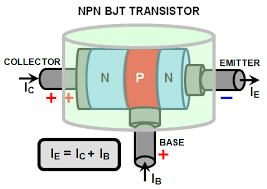 But modern predictions of the size limit are based on some very fundamental physics -- the size of the atom and the electron. Since transistors run on electric current, they must always, no matter what, be at least big enough to allow electrons through.
On the other hand, all that's really needed is a single electron at a time. A transistor small enough to operate with only one electron would be phenomenally small, yet it is theoretically possible. The transistors of the future could make modern chips seem as big and bulky as vacuum tubes seem to us today. The problem is that once devices become that tiny, everything moves according to the laws of quantum mechanics -- and quantum mechanics allows electrons to do some weird things. In a transistor that small, the electron would act more like a wave than a single particle.
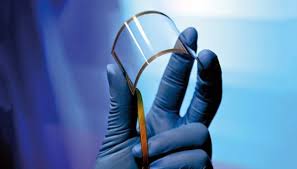 As a wave it would smear out in space, and could even tunnel its way through the transistor without truly acting on it.
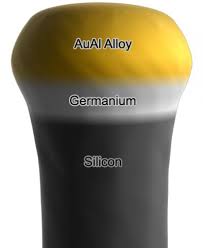
Researchers are nevertheless currently working on innovative ways to build such tiny devices -- abandoning silicon, abandoning all of today's manufacturing methods. Such transistors are known, not surprisingly, as single electron transistors, and they'd be considered "on" or "off" depending on whether they were holding an electron. (Transistors at this level would be solely used as switches for binary coding, not as amplifiers.) In fact, such a tiny device might make use of the quantum weirdness of the ultra-small. The electron could be coded to have three positions -- instead of simply "on" or "off" it could also have "somewhere between on and off." This would open up doors for entirely new kinds of computers. At the moment, however, there are no effective single electron transistors.
Even without new technologies, there's room for miniaturization. By improving on current building techniques, it's likely that current transistors will be at least twice as small by 2010. With nearly a billion transistors on Intel's latest processor that would mean four times as many transistors on a chip are theoretically possible. Chips like this would allow computers to be much "smarter" than they currently are.
With hindsight, such predictions seem ridiculous, and it's easy to think that current predictions will sound just as silly thirty years from now.
On the other hand, all that's really needed is a single electron at a time. A transistor small enough to operate with only one electron would be phenomenally small, yet it is theoretically possible. The transistors of the future could make modern chips seem as big and bulky as vacuum tubes seem to us today. The problem is that once devices become that tiny, everything moves according to the laws of quantum mechanics -- and quantum mechanics allows electrons to do some weird things. In a transistor that small, the electron would act more like a wave than a single particle.
Researchers are nevertheless currently working on innovative ways to build such tiny devices -- abandoning silicon, abandoning all of today's manufacturing methods. Such transistors are known, not surprisingly, as single electron transistors, and they'd be considered "on" or "off" depending on whether they were holding an electron. (Transistors at this level would be solely used as switches for binary coding, not as amplifiers.) In fact, such a tiny device might make use of the quantum weirdness of the ultra-small. The electron could be coded to have three positions -- instead of simply "on" or "off" it could also have "somewhere between on and off." This would open up doors for entirely new kinds of computers. At the moment, however, there are no effective single electron transistors.
Even without new technologies, there's room for miniaturization. By improving on current building techniques, it's likely that current transistors will be at least twice as small by 2010. With nearly a billion transistors on Intel's latest processor that would mean four times as many transistors on a chip are theoretically possible. Chips like this would allow computers to be much "smarter" than they currently are.
Subscribe to:
Posts (Atom)